
Google Ads for Commercial Cleaning | Janitorial Lead System

Google Ads for Commercial Cleaning

Commercial Cleaning Google Ads Isn’t About More Leads — It’s About Contract-Fit Leads

Residential ads live and die by speed. Commercial ads live and die by trust + qualification. The decision maker isn’t always the person who fills out the form, the timeline is rarely “today,” and the real sale is often a walkthrough + scope confirmation before pricing ever gets approved.

This page is built for janitorial and commercial cleaning companies that want Google Ads to produce qualified opportunities—not endless “how much per hour?” calls that never become contracts. We focus on what actually drives approvals: the right filters, the right intake questions, and a follow-up sequence that matches how commercial buyers say yes.

Start here: Use our Commercial Lead Qualification Scorecard to rate lead fit, generate minimum filters, and build an intake form + call script your team can use immediately.
Run the Qualification Tool

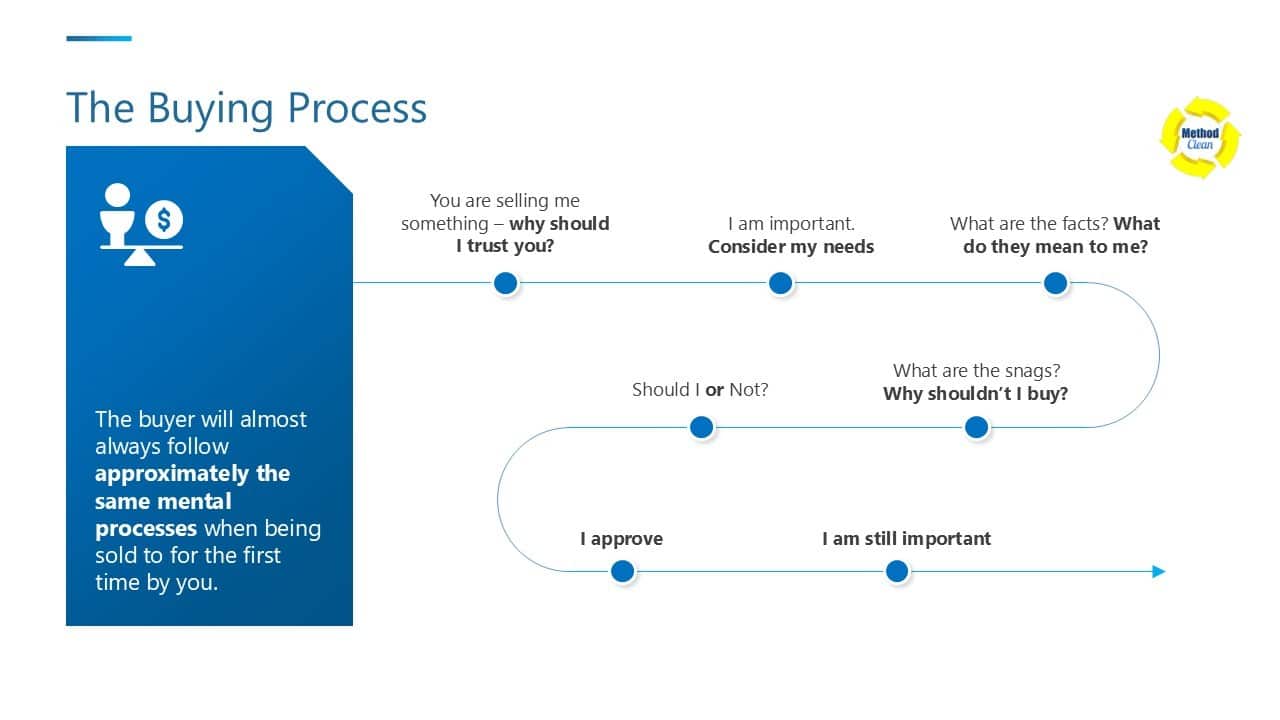
Diagram titled “The Buying Process” showing a buyer journey: “Why should I trust you?”, “Consider my needs”, “What do the facts mean to me?”, “Why should I buy?”, and “I approve.”
Commercial buyers approve vendors through a trust-and-fit process — your ads and intake flow should match that reality.

A quick commercial mindset shift

In residential, the question is: “Can you come this week?”
In commercial, the question is: “Can I trust you with this building?”

That means your Google Ads system needs: minimum filters (frequency, scope, service area), decision-maker clarity, and a follow-up process that turns interest into a walkthrough and approval.

If you’re seeing waste from mixed intent or the wrong lead types, run: https://methodcleanbiz.com/services/google-ads/google-ads-audit/

Commercial Lead Qualification Scorecard + Intake Builder

Commercial cleaning ads win when you qualify fast. This tool helps you decide if a lead is ideal, borderline, or a pass—then generates the intake fields, call questions, and follow-up sequence your team can use immediately.

Commercial reality: the goal isn’t “more leads.” It’s fewer, better leads. If a prospect can’t match your minimum contract fit, your ads are buying busywork.

Lead Details

Scope (select what’s included)

Your minimums (to filter junk)

These minimums become your recommended ad/landing qualifiers and intake form “gates.”

Results

You’ll get a Fit Rating, recommended filters, intake form fields, call questions, and a follow-up sequence.

Fill in the lead details and click Generate Qualification + Intake.

What We Qualify (So You Don’t Waste Walkthroughs)

In commercial cleaning, the “lead” isn’t the win — the win is a walkthrough that turns into an approved scope. Qualification protects your calendar, your crews, and your CPL.

  • Decision maker involvement — if the person requesting info can’t approve budget, you need a clear path to the approver.
  • Frequency — contract-fit usually improves as frequency increases (and stabilizes schedules and revenue).
  • Square footage (or at least a range) — you can’t price responsibly without scale.
  • Scope clarity — restrooms, trash, floors, breakrooms, glass, supply restock… vague scope creates vague deals.
  • After-hours requirement — it’s fine if you can service it, but it must be confirmed early.
  • Distance / service area fit — far accounts can quietly destroy margins with travel time and scheduling friction.
  • Start timeline — urgent requests can be great (or chaotic). You qualify the timeline so your ops can actually deliver.

Why this matters: if your tracking is wrong, you’ll “optimize” for the wrong lead types and never see it in time. Lock measurement first with: https://methodcleanbiz.com/services/google-ads/google-ads-conversion-tracking-setup/ so your commercial lead filters actually show up in the numbers.

Why Commercial Cleaning Ads Fail

Commercial Google Ads usually don’t fail because “Google doesn’t work.” They fail because the system attracts the wrong kind of demand—or can’t convert the right demand into a walkthrough and approval.

Failure Pattern What It Causes
Unqualified leads Lots of “how much?” inquiries with no scope, no frequency, and no decision-maker access—your calendar fills, but revenue doesn’t.
Wrong-intent keywords You attract residential cleaning, jobs, DIY, or one-time work when you actually need contract-fit janitorial demand.
No minimums (filters) You price every tiny opportunity, do walkthroughs that can’t meet your minimum contract economics, and CPL quietly inflates.
Mixed services in one campaign Message match breaks. Office cleaning, medical cleaning, and specialty work each need different trust cues and qualifiers—mixing them lowers conversion rate.
Weak follow-up Commercial sales cycles are longer. If you don’t have a walkthrough + recap + “close the loop” follow-up rhythm, the best leads go cold.

Best next step: If you suspect waste is coming from intent, geo, or tracking gaps, run the audit first: https://methodcleanbiz.com/services/google-ads/google-ads-audit/ — it’ll show you what’s leaking budget before you scale.

Minimum Filters That Protect Your CPL

Commercial ads get expensive when they attract “maybe” buyers. Your job is to turn your offer into a filter: the right people lean in, the wrong people self-select out. That’s how you protect CPL while increasing contract quality.

Minimum monthly contract

Set a baseline that makes the account worth servicing. If a prospect can’t meet your minimum, your ads are funding walkthroughs that never pencil out.

Minimum frequency

Frequency is the hidden driver of contract value. A 1x/week request often behaves like a one-time clean. A 3–5x/week request behaves like a contract.

Service area boundaries

Commercial margins die quietly in travel time. Define your coverage area and exclude the rest. The goal isn’t “more reach”—it’s operationally clean routes.

Decision maker required

If the person contacting you can’t approve budget, you’re not selling yet—you’re gathering information. Your filters should require a path to the approver before you invest heavy time.

Leakage check: If CPL is rising, don’t guess which filter to tighten. Run the audit to spot intent leakage, geo leakage, and tracking gaps: https://methodcleanbiz.com/services/google-ads/google-ads-audit/

The Intake Flow That Turns Clicks Into Walkthroughs

Commercial cleaning buyers don’t usually “buy from the ad.” They buy after a walkthrough and scope clarity. Your job is to guide the click into a qualified next step — without wasting your team’s time.

1) Ad

Lead with contract-fit language: building type, service area, minimum frequency, and trust cues. The ad should filter as much as it attracts.

2) Pre-qual form

Route clicks into a short pre-qualification form that collects what you need to price and qualify: decision maker, square footage range, frequency, scope, and start timeline.

3) Walkthrough scheduling

Convert interest into a walkthrough window. Two proposed time slots beats “When are you free?” Commercial deals move when the next step is frictionless.

4) Quote follow-up

After the walkthrough, send a recap: scope, frequency, assumptions, and next decision step. Commercial buying is risk management — clarity closes.

Build the pre-qual form the right way: Use our quote form page as your structure baseline: https://methodcleanbiz.com/services/website-design/quote-form/

And pull your exact intake fields from the tool above (it generates the field list + call questions + follow-up sequence).

The Follow-Up That Wins Contracts

Commercial cleaning leads don’t usually “ghost” because they weren’t interested. They stall because the decision involves risk, timing, and often more than one person. Your follow-up system should feel like a professional handoff — not a sales chase.

Response time expectations

Treat the first response like a contract audition. Aim for under 15 minutes during business hours when possible, and same-day at minimum. Fast response doesn’t “sell” — it signals reliability.

Touch 1 (Same day)

Goal: confirm decision path + schedule the walkthrough.

Send a short recap with two walkthrough time options. Ask one qualifying question if needed (frequency, scope, decision maker).

Touch 2 (Next business day)

Goal: reduce uncertainty.

Send a one-paragraph “scope snapshot” (what’s included, what’s assumed) and confirm who must approve. Commercial buyers move when it feels low-risk.

Touch 3 (48–72 hours): Close the loop

Goal: get a clear yes/no without sounding pushy.

Use simple “close the loop” messaging: “Should we keep this open, or close it out for now?” Include two next-step options (walkthrough slots or call times).

Close-the-loop template:
“Hi [Name] — quick check-in. Do you want to keep this janitorial request open, or close it out for now?
If you’d like to move forward, I can do a walkthrough on [Option A] or [Option B].”

Which Growth Phase Is Your Cleaning Business In?

Every cleaning company grows in stages — from fixing your website foundation to scaling steady inbound leads. Choose your phase below and we’ll guide you to the right plan.

Phase 1: Ready for a Website Redesign

You’re generating some traffic, but your site isn’t converting visitors into calls. It’s time for a site that tells your story and earns trust instantly.

Fix My Website
Phase 2: Ready to Scale Monthly Leads

Your website works — now you need predictable new clients every month. Let’s build a marketing engine that keeps your calendar full.

Grow My Leads

Not sure which phase you’re in? Let’s talk — we’ll review your site and show you the fastest path forward.

Get Your Free Growth Assessment